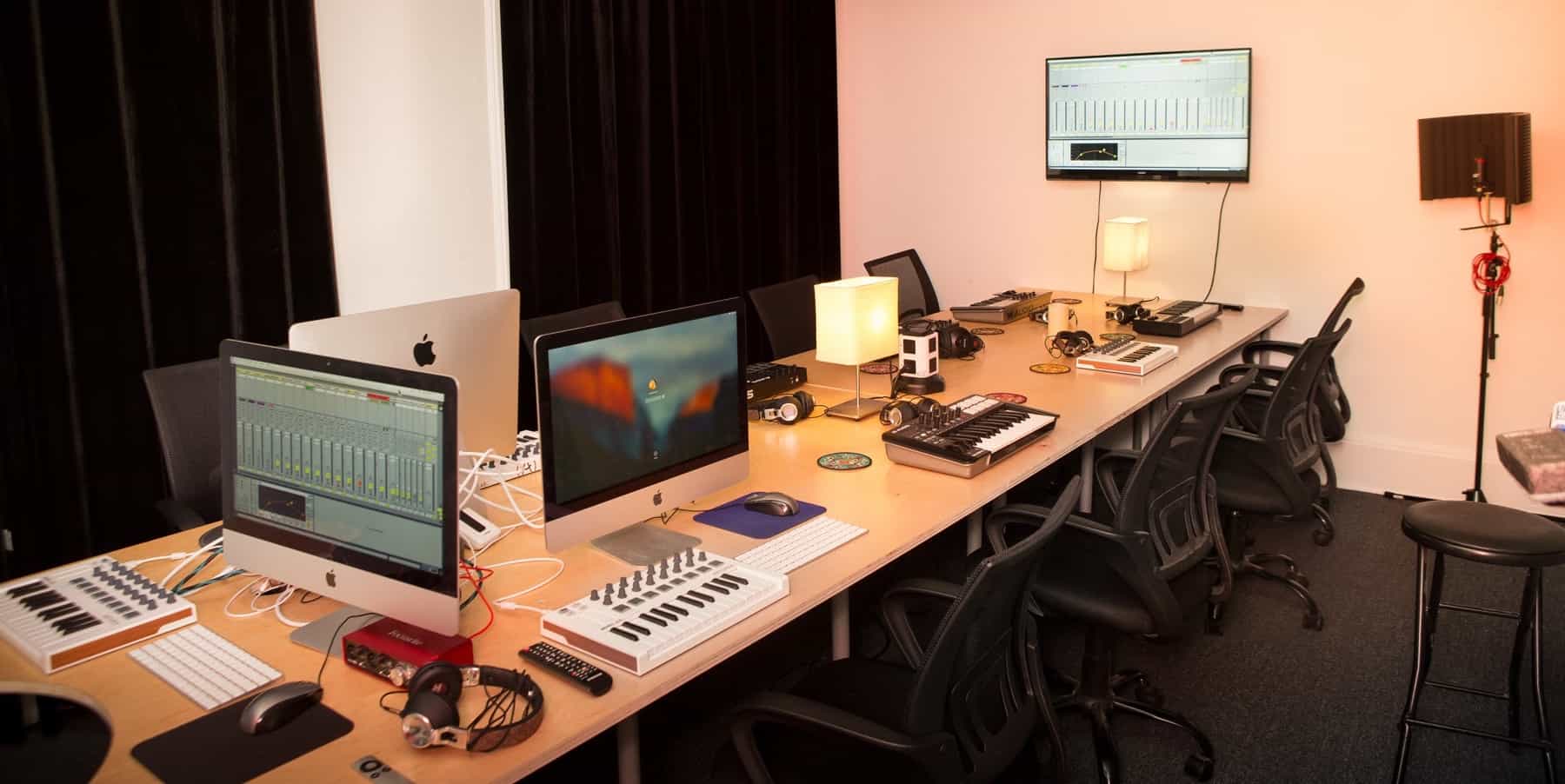
Welcome!
I’m Dave Garnish, the founder of Garnish Music Production. Along with the team in the US, we would like to welcome you. We’re excited you’ve chosen our school to do what you love, and we can’t wait to hear what you create!
The info below is intended to help you hit the ground running. Hold on to this page: it has a lot of important details in it about what to expect, where to go, and who to reach out to.
For your convenience, here's a link to our contact and map page.
342 Livingston, Brooklyn, NY, 11217
is next to the Metro Feast deli/restaurant. Just ring the bell and someone will buzz you up. If you don’t get an answer, it may be loud inside. Ring again (and come on time). Do not phone us. The person you have been speaking to on the phone probably doesn’t live in your city. See the info below on installing SLACK. This is how all communication is handled.
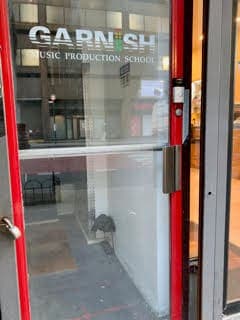
For your convenience, here's a link to our contact and map page.
421 7th Avenue, #1004, NY, NY, 10001
Your name should be on the doorman's system. Please show your ID, and he will let you in the elevator. Go to the 10th floor and walk to almost the end of the hallway to find 1004.
Any problems, post to the Discord Channel.
Once your enrollment is complete, we will direct you to use our Discord channel. Join here.
Please sign up using your actual name so we can find you if we need you! This means you, ”5exyCat-1995”. Please turn notifications on, as we will tag the whole group for important information, like schedule changes, asking if anyone has any objections. If you miss it, and don't let us know, you could miss out on classes.
We’ll show you how it works when you get here. It’s a great way for us to communicate, share info, and message each other without it being disruptive. Think of it like text messaging on steroids.
It's also a way you can stay in touch with your classmates after class, and meet people from all of our other classes. But please remember that your instructor is only contracted in the hours you are in class, so please don't be offended if they do not respond until class time.
Please see this page for the payment information.
Payment must be completed by the day before you arrive at your class, as your instructor will not have you on the system if you have not paid, so will not be able to start with you. If your class is full and there is a waitlist, which is often the case, your place will be offered to someone on the waitlist the evening before your first class if your fee is not paid. Admissions specialists will not be onsite at your class to solve any payment issues, so reach out now if you have any.
Please note that your registration fee is in addition to your course fee, so please ensure you pay your courses fee in addition. Prices are towards the bottom of the course page you booked.
Contact us now if you have any questions!
If you miss a session or are late, you will be behind, so please ensure you attend all sessions on time. If you have a family emergency or are sick, and miss class, you may be able to book and pay for a private class at a discounted rate; we'll supply the studio facility for free, but we are often full with classes, so it may not be possible.
Please note that, whatever the reason you miss class, we cannot be responsible to catch you up, and we may not have availability if you wish to book a catch-up session privately.
If you are with us all day (11a - 6p), please take a break and leave the building for an hour on your lunch break. The school is legally obliged to give the instructors a break at lunch, so we ask learners not to ask extra questions during this time. There's a great, reasonably priced deli called Metro Feast next door, a Shake Shack by the Barclays Center, and if you fancy a brisk walk, there are lots of good spots on 5th Ave going south from the Barclays Center.
Lunchtime can be an opportunity to get to know your classmates, and potentially set up collaborations!
Please do not eat in the classrooms, as nobody wants crumbs on the equipment!
Make it easy for them by tidying up at the end of your session. Place keyboards, mice, MIDI controllers, cables, headphones etc. nice and neatly with your chair tucked in neatly under the desk, and please take your trash with you when you leave, otherwise they’ll stay late and tidy up after you, because they won’t leave it in a mess for the next class.
For those who booked Remote Attendance, please ensure you have a quiet spot for your classes, away from distractions and background noises.
For those who booked in-person, as tempting as it may be not to have to get up and go out in the morning, particularly when it's a bit chilly - if you have booked and paid more for an in-person program, there is a reason you did that - it's a better experience!
For the benefit of the vibe of the class, we need to keep the ratio of remote to in-person learners to at least 50% in-person. This means that if you booked in-person, you must stay in-person, unless there is a very good reason to switch to remote for a session or two.
Any temporary switching has to be approved by management. If you made every class in-person, you'll be pleased you did when you look back!
There's no prorated refund available for anyone who switches to some remote classes - class sizes are low so margins are tight. We like it like that, but need to know the final numbers in-person and remote before we go ahead with a class.
Day One is your orientation. This is when you will meet your first instructors, get your equipment configured, and confirm/complete all your payment and enrollment details. To make this go smoothly, please have a look at the info below.
Click here for information on how to get discounts from our software brand partners.
Storage
We strongly recommend that you bring an external storage device. Computers have smaller and smaller hard drives these days and there is upwards of 500GB of content in your course — not including any of the actual projects you will be creating. Even if you rent one of our workstations, you may not have the same machine to work on day to day. Take our advice: get a small, light, fast, solid-state-drive (SSD). You won’t regret it. 500GB drives can be found for well under $100 online or locally.
Operating System
This one can be tricky. We like it when you show up with a current version of MacOS or Windows — but not too current a version. What does this mean? If you have never checked to see if you are up to date, now might be a good time to do so. But don’t jump directly to the newest operating system. Good engineers typically wait for the verdict to come in on recent updates. We like to let the masses test them for stability before we adopt all the latest and greatest features. It can be hard to go back to an earlier version once you upgrade, so if in doubt, wait & ask. We will most likely tell you to move to the system that is one sub-release behind the most current.
When in doubt, wait and ask. We’ll be happy to discuss this with you.
Downloads
Downloading our content takes time. And an entire class downloading it at the same time… you get the idea. If you need some help, don’t sweat it. That’s what we are here for and we’ll go over it together. If you are able to, we recommend that you do your best to download and install as much as you can.
For those NOT renting iMacs, please try and have your laptops with the latest version of Ableton Live installed before class. To get 40% off Ableton software, first step is to purchase the educational version of Live, which you can do here on Ableton’s website.
Once you have your license, during the registration process you will be asked to provide proof of enrollment. That’s when you would use this PDF and picture ID. Within a couple of hours your license will be validated.
Those who ARE renting an iMac, let us know now so we have enough ready in the classroom on your first day.
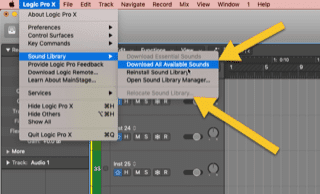
Ableton and all the additional “Packs”.
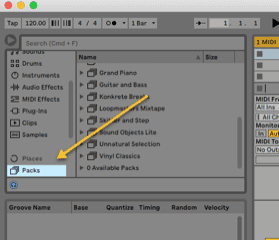
If you want to direct these to an external drive, this can be done here:
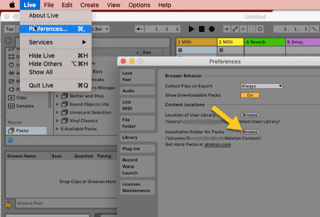
Download all the available sounds and (if needed) relocate them to an external drive.
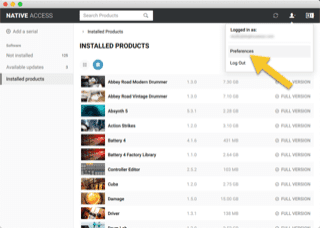
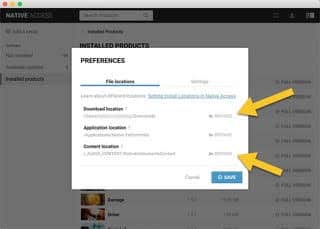
Make no mistake. Komplete contains a massive amount of content. Give yourself some time and space to download it. You’ll (always) need more space than you think. Installing the Native Instruments content requires disk-space for the download (temporarily) as well as the content. If you want to get a jump on it, it is all done through the “Native Access” application found in your Native Instruments account. Once logged in, you can proceed to download and install all of it. We may move some of the content around later, but if (when) you find yourself running low on space, this is how you direct the content to the location of your choosing.
Please be sure to bring the following. In a pinch, we’ll have some of these supplies on hand, but you will want to have:
(Recordbox is Pioneers’s free software. We will be using it extensively to prepare our songs.)
USB 3.0 flash drive 64GB or more (SanDisk usually works best, as the decks can be a bit finicky with USB’s sometimes)
Laptop You may rent one of our workstations for $100 (for the duration of the course), but we will need to set it up ahead of time. You will still need some kind of storage (see above).
Playlist of a least 50 songs
(High quality MP3s, WAV or FLAC files only)
Would recommend downloading from Beatport.com , Junodownlo
If you’re not sure about this, we’ll also go over this in class.
Over ear headphones Audio-Technica ATH-M50X and Sennheiser HD25 are 2 of the best on the market right now. For something a little cheaper try Sennheiser HD 280.
Discord is going to be the preferred way of communicating with us. Please install it on your computer and phone. You’ll be glad you did.
Our phone number is (929) 430-7904, but it doesn’t get monitored as actively as Discord.
If you have any issue you want to escalate to management; anything from something you feel uncomfortable discussing with your instructor or admissions, to a complaint, please don't hesitate to contact global management and Dave Garnish on this webpage. We'd be happy to hear from you, no matter how trivial you may think the issue may be. If you have access to this welcome page, you are extremely important to our community!
Please make use of our WiFi. The network name is Garnish 5G and the password is wehowifi. WiFi will be super-useful for sharing your screen and audio, for research, and for downloading content.
What it’s not super-useful for is browsing, shopping, Facebooking, and watching videos during class. So to state the obvious, please… if you need to take a call, please excuse yourself and do it out of the classroom. Your instructor (and probably your classmates) will take offense to you talking on the phone or otherwise ignoring the class. As the adage goes, you only get as good as you give. It is painfully difficult for your instructor to motivate a classroom full of people who can’t give eye contact.
ONLINE CLASSES: Our online classes are as good as you make them. Please treat them like you would an in-person class. We understand things are a little different and you may need some extra privacy. We promise to respect that. In turn, we ask that, whenever possible, you engage your camera. It lets us do our jobs better. We like to interact. If the internet gets slow, or your little brother is walking around without pants… yeah, we get it. Let’s just try and be as together as we can be!
We are obliged to inform you that the facilities are monitored by camera. It’s not creepy, we promise. It’s for security as well as making sure everything is always just so. This is also a way of informing you that by being on premises, you give consent to have your picture taken. It’s a legal thing.
PLEASE SEE THE NOTE ABOVE ABOUT ONLINE CLASS RECORDINGS. WE CANNOT MAKE THESE AVAILABLE TO STUDENTS.
But that aside, actually we love taking pictures! Not the creepy kind, but the kind of pictures that show you, engaged, having fun, and learning. We like to share these on social media. That said, while you technically consent to having your picture taken, we aren’t MONSTERS! Look: if you really don’t want us to share a photo, the last thing we ever want to do is make you uncomfortable. Just let us know. But the photo we take of you during orientation is important, for when you take advantage of our V.I.P. unlimited short course membership.
Pictures are also an exception to the ‘stay-off-your-phones’ request. We’d be delighted if you shared your photos with us. We’d be proud to follow you on Twitagram and hope to share many wonderful moments there — just let’s agree to keep it classy, folks!
1:1 Mentoring
Each of you is entitled to one mentoring session in the studio. It’s included in your program. You can use it for catchup sessions, revisiting course topics, but ideally, you will use it all for help with your project towards the end of your program.
They will reach out to you about half-way through your program, but feel free to reach out to them if you need help sooner. Also, your mentors are not cast in stone. You can switch once you get acquainted with the team and you know more specifically what you want to spend your mentoring time on. For example, if you wish to focus on Bass Music, you may want to switch to Heinrich; if you want to focus on top-line songwriting, you may want to switch to Mike G. No one is precious or will be offended if you wish to switch it up. You’re the priority while you are with us!
Grades
For the time being, everything you need for our exclusive “Grades” program is here. Your instructor will explain everything when you get there, so just keep this in a safe place on your laptop for now.
Unlimited short course membership
Once you are done and want to book yourself a free short course at any of our participating locations. You will be responsible for a registration fee for each class, but just let us know and we’ll work to help you set up your VIP course! We’ll need a picture of you for our records. It should go without saying, but only you can use the pass. This is also why we like to have a picture of your happiest face to share with whatever campus you attend. And about that…
If you would like and are entitled to a certificate, please email our admin email address (admin at garnishmusicproduction dot com), with the name you wish to be displayed on your certificate, whether you'd like it digitally, mailed to you or both, the address you wish your certificate to be mailed to, and the level of certificate you're expecting (Silver for short and DJ course, Gold for Producer Program, or Platinum for Academy).
If you need to stop classes for any reason, like sickness or a family emergency, you may come back on a future cycle if we have space.
If that happens, you need reach out to us a few days before the cycle you wish to attend starts to get an idea of numbers. If numbers are tight, we can only give you a decision eight hours before the class starts, or the night before if the class starts before noon. If it is a DJ course, this is particularly tricky, as we cap the class size to just four, so the wait can be more like years than months, if you are unlucky.
Refunds can only be issued if we get 48 hours notice before your class starts, as detailed in our terms. This is so we get a chance to fill your spot with someone else. Our terms aren't long or sneaky. Just fair, transparent, and necessary.
You get out what you put in. We do not have magic wands and it is down to you to put in the work if you want to make the most of this opportunity. All the success stories you see on our social media showed up for every class on time, worked hard in class, worked hard outside of class, and came back with a bunch of questions the following day. If you do not do this, your chance of making noteworthy music is slim at best.
Sorry that was a bit of an essay, but it’s pretty much all the boring stuff and now it’s out of the way!
If you need to contact me (Dave Garnish), I’m available for you anytime — but as I’m on a little island off the coast of England, so I may take tad longer to respond.
Above all, thanks for learning with us. We can’t wait to hear what you come up with! Sincerely, Dave